

Last Updated: October 28, 2026
What is GPT-3? What is the difference between GPT-3 and ChatGPT? Can you download GPT-3, and how can you use AI tools for free? These are common questions for people exploring artificial intelligence, machine learning, and AI-powered content creation.
GPT-3 was a major milestone in natural language processing. It demonstrated how a large language model could generate human-like text, answer questions, summarise documents, and assist with programming. Since its introduction, AI technology has continued to evolve, with newer models offering improved reasoning, instruction following, and multimodal capabilities.
In this guide, we explain what GPT-3 is, how it differs from ChatGPT, whether you can download it, and the options available for trying AI tools without paying.
Table of Contents
What Is GPT-3?
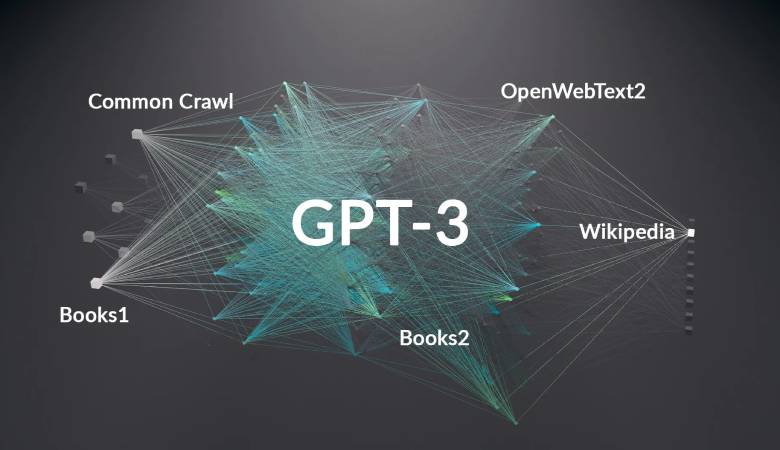
GPT-3 stands for Generative Pre-trained Transformer 3. OpenAI introduced the model in 2020, and it became widely known for its ability to generate coherent text from user-provided instructions.
GPT-3 contains approximately 175 billion parameters. These parameters are learned during training and help the model recognise patterns in language and generate responses based on its input.
GPT-3 can perform various language-related tasks, including:
- Writing articles, stories, poems, and reports.
- Summarising long documents.
- Answering questions.
- Generating and explaining programming code.
- Rewriting and editing text.
- Producing product descriptions and marketing content.
- Classifying text and extracting information.
The model uses a transformer-based neural network trained on large amounts of text. It generates responses by predicting likely subsequent tokens based on the context it receives.
However, GPT-3 does not understand information exactly as a human does. Its outputs can contain factual errors, outdated information, or misleading statements, so important information should be verified.
AI models are also increasingly evaluated through task-specific performance indicators. For a related discussion of technology evaluation, see A Technology-Related Indicator: A Deep Explanation.
What Is the Difference Between GPT-3 and ChatGPT?
GPT-3 and ChatGPT are related, but they are not the same product.
GPT-3 refers to a language model family, while ChatGPT is a conversational AI product designed to let users interact with AI through a chat interface.
ChatGPT uses models designed for conversational interaction and can provide tools and features beyond text generation, depending on the model and available product configuration.
| Feature | GPT-3 | ChatGPT |
|---|---|---|
| What it is | A language model family | A conversational AI product |
| Main purpose | Text generation and language tasks | Interactive assistance and conversation |
| Access | Historically available through developer APIs | Available through the ChatGPT interface |
| Programming | Can generate code and text | Can help explain, write, and troubleshoot code |
| Integration | Requires an appropriate application or API | Ready-to-use interface with features that vary by plan |
| Internet access | Depends on the application connected to it | Depends on available tools and product configuration |
| Model architecture | Original GPT-3 has approximately 175 billion parameters | Varies by the model being used; not defined by one fixed parameter count |
An important correction to older articles is that ChatGPT should not be described as a 117-million-parameter model. That figure does not accurately describe ChatGPT as a product. ChatGPT has used different underlying models over time, and their full parameter counts are not necessarily publicly disclosed.
Similarly, neither GPT-3 nor ChatGPT should automatically be assumed to have unrestricted internet access. Access to current information depends on the particular model, tools, and application configuration.
What Can You Do With GPT-3?
GPT-3 helped demonstrate how large language models could support a wide range of tasks. Many of these applications remain relevant to modern AI systems.
1. Content Creation
AI language models can help draft blog posts, social media captions, email campaigns, product descriptions, and other written material.
For the best results, provide clear instructions about the audience, tone, structure, and purpose. Review the final content for accuracy, originality, and relevance before publishing.
2. Programming Assistance
Language models can generate code examples, explain programming concepts, identify potential errors, and help developers explore different solutions.
However, generated code should be tested for correctness, security, and compatibility before being used in a production environment.
3. Research and Summarisation
AI can summarise supplied documents, extract key points, and organise information into structured formats. It can save time when processing large amounts of text, but users should verify important claims against reliable sources.
4. Business Automation
Businesses can integrate language models into customer support workflows, document processing, internal search, and other applications through suitable APIs and software systems.
Modern AI agents can also combine language models with tools and external services to perform multi-step tasks. For example, read about Revolutionizing AI Agent Transactions With Nevermined to explore developments in transactions and payments for AI-powered systems.
5. Creative and Digital Projects
AI tools can help creators brainstorm ideas, prepare scripts, develop marketing campaigns, and organise creative workflows.
The growing relationship between AI and digital ownership is also changing how creators explore new business models. Learn more in How the AI Creator Economy Is Democratizing Crypto.
Can You Download GPT-3?
You cannot download the original GPT-3 model weights through an official public download. GPT-3 was made available through hosted services rather than as a fully downloadable open-weight model.
If you want to experiment with language models locally, there are other options. Availability, licensing, hardware requirements, and performance vary by model.
Examples of alternative model families include:
- GPT-2: An earlier OpenAI language model with publicly released weights.
- GPT-J: An open-weight language model developed by EleutherAI.
- GPT-NeoX: An open language-modeling framework and model family associated with EleutherAI.
- BLOOM: A multilingual language model released by the BigScience research collaboration.
- T5: A text-to-text transformer model family developed by Google Research.
These models are not identical to GPT-3, and they do not all have the same capabilities or licensing conditions. Some can run on a personal computer with suitable hardware, while larger models may require substantial memory or specialised computing resources.
Before downloading a model, check its official repository, licence, supported software, and hardware requirements.
How to Use GPT-3 or Similar AI Tools for Free in 2026
The original GPT-3 experience described in older tutorials has changed. Legacy instructions referring to the original OpenAI Playground models, such as Davinci, Curie, Babbage, and Ada, should not be assumed to work today.
There are still ways to explore AI without paying, although free access depends on the product, usage limits, and current terms.
Option 1: Try ChatGPT’s Free Experience
You can start using ChatGPT through its official website:
- Visit ChatGPT.
- Create an account or sign in if prompted.
- Enter a question or instruction in the message box.
- Review the response and ask follow-up questions.
- Check the current usage limits and available features.
ChatGPT’s free experience does not mean that you are directly using the original GPT-3 model. The models and limits available in ChatGPT can change over time.
Option 2: Explore OpenAI’s API
Developers can use the OpenAI API to integrate supported AI models into applications and workflows.
A typical process involves:
- Creating an account on the OpenAI developer platform.
- Reviewing the available models and documentation.
- Setting up API billing if required.
- Generating an API key and storing it securely.
- Sending requests through the supported API.
- Monitoring usage and costs.
API access is separate from ChatGPT subscriptions. Do not assume that creating a new account automatically provides free API credits. Check the current OpenAI API pricing and billing information before sending requests.
Option 3: Run an Open-Weight Model Locally
If you want to experiment without paying for every API request, consider running a compatible open-weight model on your own computer.
You may need:
- A computer with sufficient RAM or GPU memory.
- A supported model runtime.
- The model files and required dependencies.
- Enough storage space.
- A compatible licence for your intended use.
Running a model locally can avoid per-request API charges, but electricity, hardware, setup, and maintenance still have costs. Smaller models are generally easier to run on ordinary computers.
Is GPT-3 Still Relevant in 2026?
GPT-3 remains historically important because it helped popularise large-scale language models and demonstrated their potential for text generation and few-shot learning.
However, it is no longer the default choice for every new AI project. Developers should compare currently supported models based on output quality, reasoning capabilities, speed, cost, context length, and available tools.
AI is also expanding beyond traditional text generation. Some systems now combine language models with external services, automated workflows, and specialised applications.
For example, Retain AI’s $23M Series provides a related topic for exploring developments in the AI industry and investment landscape.
AI adoption can also affect how people use digital technology in their daily lives. Read Intelligent Technology: Couch Potato for a related discussion of technology and everyday behaviour.
GPT-3 vs. Open-Weight AI Models
Choosing between a hosted AI service and a locally run model depends on your requirements.
| Consideration | Hosted AI service | Locally run model |
|---|---|---|
| Setup | Usually easier | May require technical configuration |
| Hardware | Managed by the provider | Uses your computer or server |
| Cost | May involve subscription or API charges | Hardware and operating costs |
| Privacy | Depends on the service and its data policies | More control over local processing |
| Maintenance | Managed by the provider | You manage updates and dependencies |
| Performance | Depends on the selected service and model | Depends on model size and available hardware |
For many beginners, a hosted AI interface is the simplest way to experiment. Developers with specific privacy, customisation, or offline requirements may prefer local models.
Frequently Asked Questions
Is GPT-3 free to use?
GPT-3 was historically offered through OpenAI’s developer platform, which used usage-based pricing and sometimes offered promotional credits. Do not assume that the original model or free API credits are currently available. Check the current product documentation and pricing.
Can I download GPT-3 to my computer?
The original GPT-3 weights are not publicly available as a standard official download. You can explore alternative models such as GPT-2, GPT-J, GPT-NeoX, BLOOM, and T5, subject to their licences and hardware requirements.
Is ChatGPT the same as GPT-3?
No. GPT-3 is a language model family, while ChatGPT is a conversational AI product that can use different underlying models.
Can GPT-3 generate code?
Yes. GPT-3 was capable of generating code from natural-language instructions. As with any AI-generated code, test the output and check for security issues before using it.
Does GPT-3 have access to the internet?
The original model does not inherently provide live internet access. A separate application can connect a language model to external tools or information sources, but that depends on the implementation.
Which is better: GPT-3 or a newer AI model?
For most new projects, it is worth evaluating currently supported models rather than choosing GPT-3 solely because it was an early breakthrough. The best option depends on the task, cost, reliability, privacy requirements, and available features.
Conclusion
GPT-3 was a major milestone in artificial intelligence, demonstrating how large transformer-based language models could generate text, assist with programming, summarise information, and support other language tasks.
In 2026, the AI landscape has evolved considerably. The original GPT-3 model is primarily of historical and technical interest, while newer hosted services and open-weight alternatives offer different ways to explore AI.
If you want to experiment without paying, start with the free options currently available in ChatGPT or investigate suitable open-weight models. If you are developing an application, review API pricing, model availability, licensing, and security requirements before choosing a solution.
The most effective approach is to select a model based on your actual needs, verify its outputs, and use AI as a tool to support informed decisions rather than as a substitute for reliable evidence.